



Helpful information ...

Moxy Web - 10 steps to integrating SSO with Microsoft Entra ID for IT professionals
04.09.2026

10 steps to integrating SSO with Microsoft Entra ID for IT professionals

A practical 10-step technical process for IT professionals: application registration, SAML or OIDC selection, testing, MFA, certificate rotation, and...

SSO Integration with Microsoft Entra ID in 10 Steps for IT Professionals

Yes, SSO through Microsoft Entra ID (Azure AD) is achievable and, in practice, a fairly predictable process. For older enterprise applications, use SAML 2.0; for modern applications and APIs, use OpenID Connect. The path is always the same: register the application in Entra ID, configure the ACS/redirect values, test the login, and mandatorily add MFA and conditional access. Without that last step, the integration is only half done.


In short:

  • For a successful SSO integration through Microsoft Entra ID, you first need to verify your role in Entra ID and gather all necessary application details and certificates.
  • When choosing a protocol, OIDC is recommended for new internal projects, since it's easier to integrate and enables better automation of user account management.
  • Configuration involves precisely setting URLs, certificates, attributes, and scopes, with special attention paid to correctly mapping claims and token values.
  • For on-premises applications, it's recommended to use Application Proxy for reliable access without directly exposing your network, or Seamless SSO for automatic login within a domain environment.
  • To ensure strong security, using MFA, conditional access, and certificate rotation is mandatory, together reducing risk in a centralized SSO system.

Table of Contents

Prerequisites and a Quick Checklist Before Starting Your Azure AD SSO Integration

Before you open the Microsoft Entra portal, check that you have everything you need. Poor preparation is the most common reason configuration drags on for several afternoons instead of taking one hour.

For the Azure AD SSO integration itself, you need the following:

  • The right role in Entra ID — the Application Administrator or Cloud Application Administrator role, not a Global Administrator for everyday work.
  • Application details — whether it supports SAML, OIDC, or only a password login form, and where its configuration page is located.
  • Information about the tenant type — whether the application is single-tenant (for your organization only) or multi-tenant (for multiple clients at once), since this affects the Entity ID and registration.
  • Synchronized server time — SAML tokens are sensitive to clock skew; even a few minutes' difference causes a rejected login.
  • Valid certificates — if the application requires its own signing certificate, prepare it before configuration, not during it.
  • Test users and test URLs — a separate test account without production permissions, and a test environment for the application where you can experiment without risk.

Use admin privileges only for the duration of configuration, then revoke them or time-limit them through conditional access. Never test an SSO login with a global administrator account. If the configuration goes wrong, you'll have broader access than you need, and that's an unnecessary risk.

Which Protocol to Choose: SAML, OIDC, or Password-Based SSO

Choosing a protocol isn't an aesthetic decision — it's a consequence of the architecture of the application you're connecting. Microsoft Entra ID supports three main approaches: SAML 2.0, OpenID Connect (OIDC), and password-based SSO for older systems that don't understand modern standards.

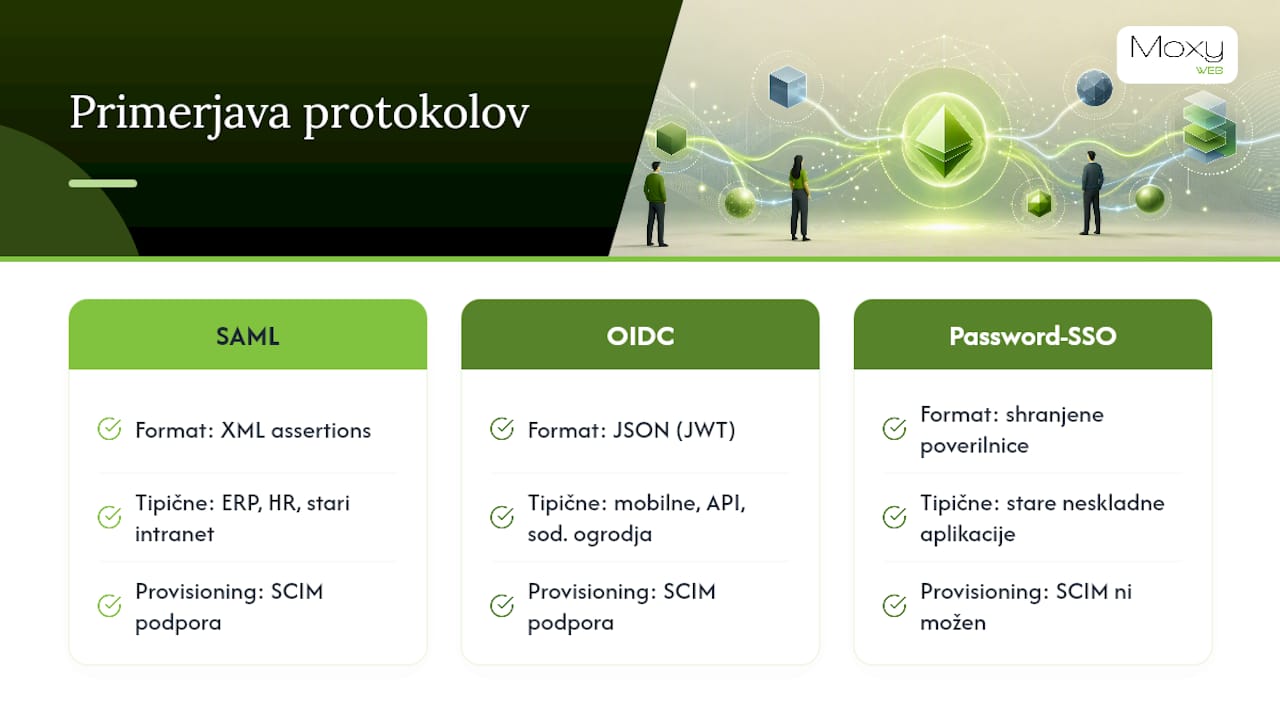
SAML works based on XML assertions. Entra ID, as the identity provider (IdP), signs an XML document, which the application (the service provider) verifies and uses to grant access. This protocol is still the standard for enterprise applications like ERP systems, HR platforms, and older intranet portals built a decade or more ago.

OIDC, built on OAuth2, uses JSON tokens (JWT) instead of XML. For developers, that means easier work. OIDC integrates far more easily with modern libraries, mobile apps, and APIs, since the token format is more compact and almost every modern development framework already understands it without additional libraries.

Password-based SSO and Application Proxy come into play when an application supports neither SAML nor OIDC at all. In that case, Entra ID stores the credentials and enters them automatically at login. This isn't true federation — it's a stopgap solution for systems you can't modify.

The decision also affects user provisioning. If you're planning automatic account creation and deprovisioning via the SCIM protocol, that's practically always tied to OIDC or SAML applications with a properly supported provisioning connector, while password-based SSO practically doesn't allow for this kind of automation.

Comparison of SAML, OIDC, and password-based SSO protocols

Expert tip: Default to OIDC for new internal projects, even if the current requirement sounds like "just login." Migrating later from SAML to OIDC means rewriting your authentication logic; the reverse migration almost never happens.

How to Register an Application and Configure SSO in Entra ID

Configuration happens on two sides at once — in Entra ID and in the application itself — so the order of steps matters.

  1. Open the Entra ID admin center and, in the Enterprise Applications section, select "New application." If the application isn't in the gallery, select "Create your own application" and enter a name.
  2. Choose your SSO protocol in the Single sign-on tab: SAML or OIDC, based on the decision from the previous section.
  3. For SAML configuration, enter the Identifier (Entity ID), which is the application's unique identifier, and the Reply URL (also called the ACS URL), where Entra ID sends the signed assertion after a successful login. Get both of these values from the application's documentation, not by guessing.
  4. Download the SAML certificate (Base64 or raw format) from Entra ID and upload it into the application's configuration, where it's used to verify the signature of incoming assertions.
  5. Check attributes and claims — Entra ID sends email, first name, and last name by default, but most enterprise applications expect additional attributes, such as role or department. Add these in the Attributes & Claims section.
  6. For OIDC configuration, create an App registration in Entra ID, where you get the client_id and tenant_id. Create a client secret (or, better, a certificate, which is more secure than a static secret) and store it safely — for example, in Azure Key Vault, not in a config file.
  7. Enter the redirect URI exactly as the application expects it, including the protocol (https) and any path. An incorrect redirect URI is the most common reason for a rejected OIDC login.
  8. Set your scopes (e.g., openid, profile, email) and think through token lifetime — a shorter lifetime means better security, but more frequent re-authentication.
  9. Enter the values you obtained into the application — client_id, client secret or certificate, tenant endpoint URL, and scope settings go into the application's config file or environment variables.
  10. Test the login using the "Test" button in the Entra ID portal, which simulates a test user login and returns diagnostic information about any errors.

Expert tip: The most common source of errors at launch isn't a wrong certificate — it's incorrect attribute mapping or a wrong audience/issuer value. It's worth automating a check on this mapping as part of your CI/CD tests, rather than checking it manually with every change.

SSO for On-Premises Applications: Application Proxy and Seamless SSO

Not every application lives in the cloud. For on-premises systems running in your own data center, Entra ID offers two mechanisms that solve different problems.

Application Proxy works as a reverse proxy. An external user accesses a public URL, Entra ID verifies their identity, and only then routes the request into the internal network where the application actually runs. This means an on-premises application doesn't need to be exposed directly to the internet, significantly reducing the attack surface.

The path of a request through Application Proxy

Seamless SSO solves a different problem: automatic login within a domain network, without re-entering a password, when a user is already logged into Windows. To work, it needs properly configured Microsoft Entra Connect and appropriate settings on client devices, or automatic login simply won't trigger.

In hybrid scenarios, one detail is critical and often overlooked:

  • Seamless SSO creates a special computer account in your on-premises Active Directory called AZUREADSSOACC.
  • This account holds a Kerberos key that actually powers automatic login for the entire organization.
  • Microsoft recommends regularly rotating this key, typically every 30 days.
  • Without key rotation, this single account becomes one of the biggest unnoticed vulnerabilities across the entire hybrid environment.

Operationally, the rule is: if you have a mix of on-premises and cloud applications, roll out Application Proxy and Seamless SSO together, not separately, since they solve complementary access and login problems.

Security Practices: MFA, Conditional Access, and Certificate Rotation

SSO centralizes access into a single entry point, which means Entra ID becomes the most critical resource in your entire infrastructure. This centralization calls for additional security layers, not less security, since a compromised SSO account opens the door to every connected application at once.

Key measures you shouldn't skip:

  • Multi-factor authentication (MFA) should be mandatory for all users, not just administrators. Passwordless options, such as FIDO2 keys, significantly ease everyday SSO login in this context.
  • Stricter policies for admin accounts — separate admin accounts without an email mailbox, limited session duration, mandatory conditional access.
  • Conditional Access should require additional verification (step-up authentication) when logging in from a new location, an unknown device, or outside working hours.
  • Certificate and key rotation on a predefined schedule, not only once they expire and logins start failing.
  • Shortening token lifetime for sensitive applications, reducing the window in which a stolen token is useful.
  • Integration with a SIEM system to monitor for login anomalies, and regular security audits of access permissions.

SSO isn't a substitute for MFA — it's its essential partner. As analyses of the relationship between these two mechanisms point out, SSO is part of a broader Zero Trust strategy, not a standalone security solution, and implementing one without the other leaves the system exposed.

How to Test SSO and Fix Common Errors

Testing SSO isn't a one-time event at launch — it's a repeating process with every change to configuration, certificates, or the application.

There are three basic diagnostic tools: the Test SSO feature within the Entra ID portal, which simulates a login and returns a structured error description; the SAML tracer browser extension, which displays the content of the XML assertion in real time; and your browser's developer console (Network tab), where you can see the actual HTTP requests and responses during login. Combining these three tools covers almost every error scenario, from a wrong URL to a missing attribute.

The most common errors and quick fixes:

  1. Incorrect ACS/Reply URL — check that the value in Entra ID matches the value in the application character for character, including any trailing slash.
  2. Clock skew — synchronize your server clock via NTP; SAML tokens typically allow only a few minutes of tolerance.
  3. Invalid or expired certificate — check the expiration date and that the correct format is uploaded (Base64 vs. raw).
  4. Claim mismatch — an attribute the application expects (e.g., role) isn't mapped in Entra ID, or is named differently than in the configuration.

Expert tip: When login fails without an obvious error, check the audience and issuer values in the token first. These two account for a surprisingly large share of "mysterious" rejections that developers otherwise chase down the wrong path.

What Actually Goes Wrong in SSO Projects

In practice, the same mistakes repeat over and over in SSO implementations, regardless of company size or industry. The most common is underestimating the attribute-mapping phase, since "just login" seems simple until the first rejected session hits production. Another common mistake is testing with an admin account, which hides problems that only appear for a regular user with limited permissions.

In external system integration projects, Moxy-web uses a phased approach that minimizes these mistakes: first, analyzing the existing environment and choosing a protocol, then a pilot rollout to a limited group of users, followed by a controlled rollout to the entire organization, and finally ongoing monitoring of logins and certificates. This sequence isn't bureaucratic overhead — it's the reason production errors get caught during the pilot phase, not on a Monday morning when the entire company is waiting to log in.

— Ziga

How Moxy-web Helps You Implement SSO Integration

Moxy-web is a sensible choice for businesses that want to get SSO right the first time, not through several rounds of fixes after launch. Our offering covers the entire integration cycle: analyzing your existing IT environment and choosing a protocol, configuring the SAML or OIDC connection, thorough testing before production, and ongoing maintenance and upgrades as applications or security requirements change. Instead of your development team spending weeks testing configurations alongside their regular work, a partner who already understands attribute mapping, certificate rotation, and conditional access settings takes on the project. For inquiries about SSO integration or a broader digital overhaul, visit Moxy-web and describe your current environment and the applications you use. An initial assessment reveals which protocol and approach best fit your infrastructure.

Sources

For a deeper dive into the technical details, the following sources are available:

Frequently Asked Questions

What is SSO integration with Azure AD or Entra ID?

SSO integration with Microsoft Entra ID means a user logs in once and then accesses every connected application through the SAML, OIDC, or password-based protocol without re-entering their password.

Do I need SAML or OIDC for my application?

For older enterprise systems, use SAML 2.0; for modern web and mobile applications and APIs, OpenID Connect is generally the better choice, since it's easier to integrate with modern libraries.

How often should I rotate the Kerberos key for Seamless SSO?

Microsoft recommends rotating the AZUREADSSOACC account key at least every 30 days, since without regular rotation, this key becomes a vulnerable point across the entire hybrid environment.

Does SSO replace the need for MFA?

No. SSO and MFA complement each other within a Zero Trust strategy; centralized access through SSO actually increases the need for mandatory multi-factor authentication, rather than reducing it.

How does Moxy-web help with SSO implementation?

Moxy-web carries out an environment analysis, configures the SAML or OIDC connection, tests before launch, and provides ongoing maintenance of the integration, so the business doesn't have to take on the entire technical risk alone.

Moxy Web - Best practices for protecting user data
Best practices for protecting user data: practical steps for a safer website, store, and more trust in your company for every online purchase.
Moxy Web - 10 steps to integrating SSO with Microsoft Entra ID for IT professionals
A practical 10-step technical process for IT professionals: application registration, SAML or OIDC selection, testing, MFA, certificate rotation, and...
Moxy Web - How to protect forms from online abuse
Learn how to protect forms from spam, data theft, and attacks, and maintain a fast, friendly, and reliable user experience on your website.
Archive
4. 9. 2026
Best practices for protecting user data
4. 9. 2026
10 steps to integrating SSO with Microsoft Entra ID for IT professionals
3. 9. 2026
How to protect forms from online abuse
3. 9. 2026
When to order a dark mode website for businesses so it doesn't fall apart
2. 9. 2026
How much does an app cost for your business?
2. 9. 2026
Prevent role explosion: RBAC user roles for IT and development
1. 9. 2026
Time-saving company user portal
1. 9. 2026
Operators: Check RTO, RPO, and site recoverability within 30 days
31. 8. 2026
Best practices for corporate web design
31. 8. 2026
Implement two-factor login in CMS for administrators in four steps
30. 8. 2026
Example of integrating a web application with logistics
30. 8. 2026
Measure in production: Core Web Vitals audit for developers and marketers
29. 8. 2026
Overview of content management tools for businesses
29. 8. 2026
3-5 KPIs for websites and instructions for GA4, GSC and Matomo
28. 8. 2026
What does website accessibility mean for a business?
28. 8. 2026
Legally compliant online store in Slovenia: what you need to arrange
27. 8. 2026
The future of headless online stores in practice
27. 8. 2026
Headless CMS: what is it and who really benefits from it
26. 8. 2026
Web Analytics Guide for Better Decisions
26. 8. 2026
Online store renovation: when is the time and how to start
25. 8. 2026
Example of a user portal for companies
25. 8. 2026
WAF for Web Applications: How It Works and When You Need It
24. 8. 2026
The best portal features for efficient work
24. 8. 2026
Transactional Email in Ecommerce: What to Edit First
23. 8. 2026
Web analytics for better business decisions
23. 8. 2026
Why data is important when building a website
22. 8. 2026
Elements of trust of the decision-making party
22. 8. 2026
User Interface Easy Management Guide
21. 8. 2026
Website data security without the guesswork
21. 8. 2026
What are security protocols for websites and applications?
20. 8. 2026
How to speed up a page without losing functionality
20. 8. 2026
What is user experience and why does management decide about it?
19. 8. 2026
The future of custom development for companies today
19. 8. 2026
Why data backups are important for every business
18. 8. 2026
Best practices for mobile user experience
18. 8. 2026
What is digital transformation and why is it important for businesses?
17. 8. 2026
How to design an administrative user interface
17. 8. 2026
Why SEO is important for marketers and businesses
16. 8. 2026
Optimizing inquiry forms for multiple customers
16. 8. 2026
Page Load Speed: A Business Guide for Decision Makers
15. 8. 2026
Example of a sales-oriented website redesign
15. 8. 2026
SPA or MPA: which architecture suits your project?
14. 8. 2026
Key elements of an effective product page
14. 8. 2026
Mobile first approach: a guide for developers and site owners
13. 8. 2026
UX design for companies with a clear goal
13. 8. 2026
Online advertising for entrepreneurs and marketers in Slovenia
12. 8. 2026
Mobile-friendly business website sales
12. 8. 2026
UX research: what it is and how to conduct it step by step
11. 8. 2026
Best online ordering solutions in practice
11. 8. 2026
Microservices Architecture: An In-Depth Explanation and Decision Guide
10. 8. 2026
How to connect external systems: a practical guide for businesses
10. 8. 2026
Why do I need SSL on my website?
10. 8. 2026
How to edit a multilingual website for foreign markets
9. 8. 2026
What does unique website design mean for businesses?
8. 8. 2026
Online Backup Guide for Businesses
8. 8. 2026
The role of mobile adaptability for businesses in Slovenia
7. 8. 2026
An example of reducing abandoned online shopping carts
7. 8. 2026
Stripe vs PayPal for a Slovenian company: which one to choose?
6. 8. 2026
A guide to revamping your online store without the guesswork
6. 8. 2026
WooCommerce vs Shopify: Which Platform is Right for You?
5. 8. 2026
Dedicated hosting or shared hosting?
5. 8. 2026
What is an SSL certificate and why does your website absolutely need one?
4. 8. 2026
The most important features of a business website
4. 8. 2026
External Systems Integration Guide for Enterprises
3. 8. 2026
Rental platform or your own store for growth?
3. 8. 2026
The best website building tools for businesses
2. 8. 2026
What does monthly website maintenance include?
2. 8. 2026
Business app feature list: top 20 by priority
1. 8. 2026
How to arrange secure website hosting
1. 8. 2026
Types of Hosting for Businesses: A Practical Guide 2026
31. 7. 2026
Project Technical Specification Guide
31. 7. 2026
Website design for companies in Slovenia
30. 7. 2026
Best integrations for online business
30. 7. 2026
Price of website development in Slovenia 2026
29. 7. 2026
How to prepare web application functionalities
29. 7. 2026
Websites for businesses: a guide to making the right decision
28. 7. 2026
Hiring an agency or a freelancer - what to choose?
28. 7. 2026
Editing Websites with WordPress: A Guide 2026
27. 7. 2026
Business Hosting Review for Enterprises
27. 7. 2026
Independent website creation for beginners
26. 7. 2026
The best CMS for business growth is not always the same
26. 7. 2026
Steps to improve website user experience
25. 7. 2026
Manage inventory in your online store without the guesswork
25. 7. 2026
Why automate processes in your company?
24. 7. 2026
When to choose a custom store design?
24. 7. 2026
Benefits of freelance content editing for businesses
23. 7. 2026
Trends in the development of online stores in 2026
23. 7. 2026
Domain Registration Guide: Step by Step
22. 7. 2026
Development of web portals that support growth
22. 7. 2026
What is data security and how to protect data
21. 7. 2026
Custom development or Shopify: what to choose?
21. 7. 2026
The role of analytics in the development of strategic HR management
20. 7. 2026
A guide to developing a custom web application
20. 7. 2026
Digital Presence: Key Steps for Businesses in 2026
19. 7. 2026
A company's digital strategy that brings business
19. 7. 2026
Website Redesign: A Guide for Entrepreneurs 2026
18. 7. 2026
B2B portal that simplifies ordering for customers
18. 7. 2026
Creating a WordPress website for businesses: a guide 2026
17. 7. 2026
How much does it cost to maintain a store per month?
17. 7. 2026
The role of technological innovation for business competitiveness
16. 7. 2026
Custom CMS or WordPress for business growth
16. 7. 2026
List of CMS Platforms for Enterprise: A Guide for Managers 2026
15. 7. 2026
How to choose a web developer without making costly mistakes
15. 7. 2026
Why professional hosting determines the success of a website
14. 7. 2026
WordPress or a custom website for growth?
14. 7. 2026
Examples of modern design: inspiration for projects 2026
13. 7. 2026
Website integration with CRM without losing leads
13. 7. 2026
What is content strategy: a guide for businesses
12. 7. 2026
Example of revamping an outdated website
12. 7. 2026
Benefits of Responsive Design for Businesses in 2026
11. 7. 2026
User experience personalization trends
11. 7. 2026
How to plan your company's digital transformation in 2026
10. 7. 2026
Web application or Excel - what to choose?
10. 7. 2026
Why content management is key to your success
9. 7. 2026
An example of a successful B2B online store
9. 7. 2026
The role of external systems integration in business
8. 7. 2026
Best practices for product filters
8. 7. 2026
The process of creating a graphic image: a guide for 2026
7. 7. 2026
When does a company need a website redesign?
7. 7. 2026
Why use API integrations in business?
6. 7. 2026
Trends in business web systems security
6. 7. 2026
Why user analytics is important for growth
5. 7. 2026
Business online security without empty promises
5. 7. 2026
How to Set Up Hosting for a Business: Guide 2026
4. 7. 2026
Evaluation of CMS solutions for businesses without fogging
4. 7. 2026
What is Graphic Design: A Guide for Businesses 2026
3. 7. 2026
Hire an agency or develop in-house?
3. 7. 2026
What is a domain and why every business needs one
2. 7. 2026
Why a business needs a web application
2. 7. 2026
Why security updates are important in 2026
1. 7. 2026
Content strategy for a business page
1. 7. 2026
Top 4 agency alternatives for novisplet.com 2026
30. 6. 2026
Does a company need its own CMS?
30. 6. 2026
What is Modern Design: A Guide for Businesses 2026
29. 6. 2026
How to choose the right domain for your business
29. 6. 2026
What is a corporate visual identity: a guide for 2026
28. 6. 2026
Overview of online commerce platforms
28. 6. 2026
How to Design Responsive Websites: A 2026 Guide
27. 6. 2026
How to choose an online store structure
27. 6. 2026
Marketing checklist for a company's digital presence
26. 6. 2026
Best features for a B2B portal
26. 6. 2026
What is User Experience Personalization: A Guide 2026
25. 6. 2026
Shopify or custom store?
25. 6. 2026
Digital Strategy Creation Workflow: Guide 2026
24. 6. 2026
What does custom development mean in practice?
24. 6. 2026
How technical support works: a guide for entrepreneurs
23. 6. 2026
What are design standards: a guide for businesses
23. 6. 2026
How long does it take to create a store?
22. 6. 2026
How to prepare a brief for a website
22. 6. 2026
UX Design Best Practices for Digital Professionals
21. 6. 2026
Business Systems Integration Guide
21. 6. 2026
Workflow for digital company presentation: guide 2026
20. 6. 2026
Best solutions for content editing
20. 6. 2026
Why choose custom development for your business?
19. 6. 2026
Landing page design that sells
19. 6. 2026
Tips for easily managing content in your company
18. 6. 2026
Purchase funnel optimization that sells
18. 6. 2026
Top 6 alternatives to moxy-designs.com in 2026
17. 6. 2026
Top mistakes in website redesign
17. 6. 2026
Top 6 alternatives to mojaspletka.si agencies 2026
16. 6. 2026
What is included in web hosting?
16. 6. 2026
Benefits of scalable applications for growing businesses
15. 6. 2026
Responsive website design without compromise
15. 6. 2026
The Role of Digital Presence for Business Growth 2026
14. 6. 2026
The Role of Automation in Business: A Guide to 2026
14. 6. 2026
Website user experience counts
13. 6. 2026
Tips for improving your digital presence in 2026
13. 6. 2026
How to prepare content for a website
12. 6. 2026
What is website accessibility: a guide for entrepreneurs
12. 6. 2026
Website maintenance for businesses
11. 6. 2026
Benefits of the Modular Web for Businesses in 2026
11. 6. 2026
Trouble-free maintenance of online systems
10. 6. 2026
Step by step: creating a portal for entrepreneurs
10. 6. 2026
A B2B online store that really accelerates sales
9. 6. 2026
The role of digital strategy for business growth in 2026
9. 6. 2026
Managing website content without chaos
8. 6. 2026
What is an e-commerce platform: a guide for businesses 2026
8. 6. 2026
How to connect an online store to ERP
7. 6. 2026
The Role of Fast Page Loading for Entrepreneurs 2026
7. 6. 2026
Guide to redesigning your business website
6. 6. 2026
Content Editing Steps: A Guide for Businesses 2026
6. 6. 2026
How to improve website conversions
5. 6. 2026
Why use an SSL certificate for a secure website?
5. 6. 2026
A booking system that really saves time
4. 6. 2026
The Role of SEO for Businesses: Growth Strategy 2026
4. 6. 2026
How long does it take to develop a web application?
3. 6. 2026
Web Application Development Guide 2026
3. 6. 2026
Payment system integration for online stores
2. 6. 2026
The Role of Analytics in Digital Business: A Guide to 2026
2. 6. 2026
Website or store - what to choose?
1. 6. 2026
GDPR v spletnem okolju: vodnik za podjetja 2026
1. 6. 2026
How is the development of an online store going?
31. 5. 2026
Top 6 how much does it cost to create an agency website 2026
31. 5. 2026
Online Business Automation Trends 2026
30. 5. 2026
The role of artificial intelligence in the web: a guide to 2026
30. 5. 2026
Website Migration Guide
29. 5. 2026
What is front-end development: a guide for 2026
29. 5. 2026
Online User Experience Trends 2026
28. 5. 2026
Website Design: A Guide for Entrepreneurs 2026
28. 5. 2026
Trends in the development of business portals in practice
27. 5. 2026
List of mandatory online store functionalities 2026
27. 5. 2026
When does it make sense to redesign a website?
26. 5. 2026
What is a landing page and why is it key to sales?
26. 5. 2026
How to design a business website
25. 5. 2026
Website Hosting Guide: Choosing and ManagingWebsite Hosting Guide: Choosing and Managing
25. 5. 2026
How to edit content without a programmer
24. 5. 2026
What is UX on the web: a guide for entrepreneurs
24. 5. 2026
WordPress or custom development?
23. 5. 2026
Individual approach in web development: why it matters
23. 5. 2026
Corporate graphic image price: what influences it
22. 5. 2026
A Guide to Website Design in 2026
22. 5. 2026
Creating a custom website pays off
21. 5. 2026
Website Maintenance Process: A Guide for Businesses
21. 5. 2026
The best functionalities of a business online store
20. 5. 2026
Website Creation Checklist: Guide 2026
20. 5. 2026
Creating online stores for businesses
19. 5. 2026
Website Development: A Practical Guide for Entrepreneurs
19. 5. 2026
Business systems integration without chaos
18. 5. 2026
The most common mistakes in developing web solutions
18. 5. 2026
Website support that really works
17. 5. 2026
Examples of aesthetic website design
17. 5. 2026
B2B portal development guide
16. 5. 2026
Definition of Modern Web Development: A Guide for Entrepreneurs
16. 5. 2026
Pre-built platform or custom solution?
15. 5. 2026
Web application scalability: the key to business growth
15. 5. 2026
How to improve website speed
14. 5. 2026
What is web hosting and how to choose the right solution
14. 5. 2026
A guide to a secure business website
13. 5. 2026
Top 10 online trends for businesses: digital growth 2026
13. 5. 2026
A business website that works for a company
12. 5. 2026
Why test online solutions for business success
12. 5. 2026
Choosing an online store platform
11. 5. 2026
Examples of integrating web tools for efficient business
11. 5. 2026
Graphic design for a company that sells
10. 5. 2026
Step by step to successful web application development
10. 5. 2026
UX design of an online store that sells
9. 5. 2026
What is an online store and how to set one up successfully
9. 5. 2026
Graphic design of the overall image
8. 5. 2026
Investing in a website: The key to business growth
8. 5. 2026
Renovate an outdated website without the guesswork
7. 5. 2026
What is a web application and how does it help your business?
7. 5. 2026
How Website Maintenance Works
6. 5. 2026
Effectively Managing Website Content: A Guide for Businesses
6. 5. 2026
Responsive website for business
5. 5. 2026
What is online branding and how does it improve your appearance?
5. 5. 2026
Custom CMS for your business or off-the-shelf solution?
4. 5. 2026
Business Process Automation with a Web Application
4. 5. 2026
Web architecture: the key to a better online presence
3. 5. 2026
Online store integration with delivery
3. 5. 2026
How to design unique online solutions for business growth
2. 5. 2026
Connecting your online store to your accounting
2. 5. 2026
Explaining modern web applications for business growth
1. 5. 2026
What is e-commerce? Everything SMEs need to know to succeed
1. 5. 2026
Corporate Website Security Without Illusions
30. 4. 2026
Top 4 oxmo.si alternatives 2026
30. 4. 2026
Registering a domain name for your business without mistakes
29. 4. 2026
Static vs. Dynamic Website: What It Means for Your Business
29. 4. 2026
Business Website Hosting
28. 4. 2026
Web Design Trends for a Better Digital Presence
28. 4. 2026
Website Maintenance - Price and Reality
27. 4. 2026
How to Build an Online Store
27. 4. 2026
Top 6 mojbiz.si alternatives 2026
26. 4. 2026
What does building a website involve?
26. 4. 2026
Modern Technologies for Successful Web Development and Growth
25. 4. 2026
When is a custom web application the right choice?
25. 4. 2026
8 Benefits of a Modern Online Store for Business Success
24. 4. 2026
How to Optimize Your Website for Better Results
24. 4. 2026
Creating an online store - price without fog
23. 4. 2026
Why Website Speed ​​Is Key to Success
23. 4. 2026
How much does it cost to create a website?