


Helpful information ...

Moxy Web - What is front-end development: a guide for 2026
29.05.2026

What is front-end development: a guide for 2026

Discover what front-end development is and how it shapes the user experience. Learn about key technologies in our guide to 2026!

What Is Front-End Development: A Guide for 2026


TL;DR:

  • Front-end development is a technical discipline that shapes the user experience in the browser using HTML, CSS, and JavaScript. The focus is not only on appearance but also on performance, accessibility, and responsiveness, all of which directly affect business outcomes. Core concepts include a component-based approach, Core Web Vitals optimization, and API integration, requiring broad expertise and continuous learning.

Front-end development is a field that many people mistakenly associate solely with website design. In reality, it is a technical discipline that determines what users see in their browser and how they interact with content directly. We fully understand what front-end development is only when we recognize that it combines structure, visual design, interactivity, and measurable performance. Front-end development encompasses building user interfaces using HTML, CSS, and JavaScript, while also optimizing performance, accessibility, and user experience. It is not just about aesthetics. It is a technical practice that directly impacts business results.

Table of Contents

Key Takeaways

Point Details
Front-end is not just design It includes performance, accessibility, responsiveness, and security—not just visual appearance.
Three core technologies HTML, CSS, and JavaScript form the foundation of every front-end project without exception.
Core Web Vitals matter LCP, INP, and CLS metrics directly influence search rankings and user experience.
APIs are the bridge to data The front end retrieves live data from back-end systems through APIs; without them, websites would remain static.
AI is a tool, not a replacement AI accelerates coding, but professional expertise remains essential for complex optimizations.

Technical Foundations of Front-End Development

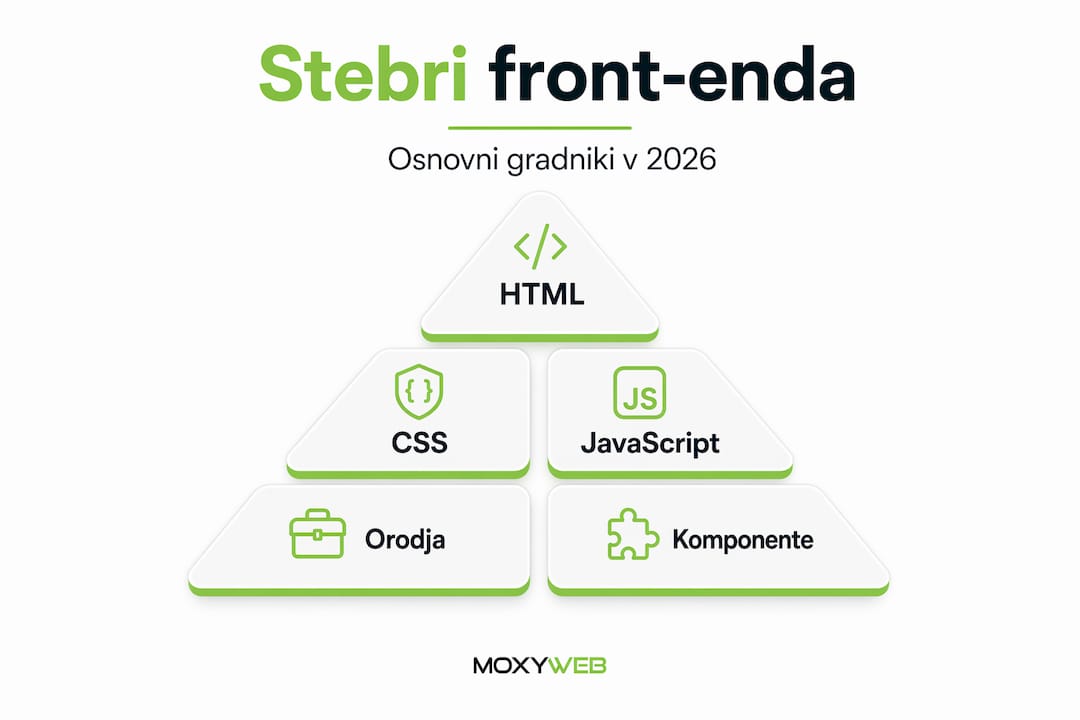
The fundamentals of front-end development rest on three pillars that together create everything you see in a browser. Without understanding each of them, it is impossible to build high-quality web interfaces.

HTML is the skeleton of every website. It defines the structure of content: where headings, paragraphs, buttons, and links belong. HTML itself does not control appearance; it provides meaning and hierarchy. Properly structured HTML is also critical for accessibility because screen readers used by visually impaired users rely on HTML to interpret content.

CSS takes over when it comes to visual design. It defines colors, typography, spacing, and layout. One of CSS’s most important capabilities is responsive design, ensuring that a website displays correctly on both mobile phones and large desktop screens. Without well-crafted CSS, a website might function, but it would be unusable for most visitors.

Visual representation of the key pillars of user interface development

JavaScript adds interactivity and dynamic behavior. When you click a button and a menu opens, when a form validates input in real time, or when content updates without reloading the page, JavaScript is responsible. It also manages communication with server-side APIs, which we will discuss in more detail later.

What does a front-end developer do in practice? Beyond writing these three technologies, they:

  • Test interfaces across different browsers (Chrome, Firefox, Safari, Edge)
  • Optimize loading speed by reducing file sizes and deferring unnecessary scripts
  • Ensure accessibility compliance according to WCAG guidelines
  • Integrate visual components with data from back-end APIs
  • Test responsiveness across various devices and screen resolutions

Modern front-end development tools encompass an entire ecosystem: from code editors like VS Code to package managers such as npm and build tools like Vite or Webpack. Each tool solves a specific problem, and together they form today’s development workflow.

Component-Based Development and Design Implementation

Modern front-end development is no longer built page by page. Instead, it relies on a component-based approach where every part of the interface—a button, card, navigation bar, or form—is a reusable unit of code. Leading front-end frameworks such as React, Vue, and Svelte are built around this concept.

When translating designs into code, developers must account for edge cases such as long content, empty states, and mobile keyboards. This is one of the key differences between average and high-quality front-end work. A designer may create an ideal example in Figma using a short eight-character name. In reality, a user may arrive with a forty-character name, and the component must adapt without breaking visually.

Here is how an effective front-end developer approaches turning designs into functional interfaces:

  1. Understand the component’s purpose. Before writing code, understand why the component exists and the contexts in which it will be used.
  2. Identify edge cases. What happens if the text is too long? What if there is no data? What if an image fails to load?
  3. Build a flexible structure. Components must work with both minimal and maximum input, not only ideal scenarios.
  4. Test across devices. Every component should be tested on phones, tablets, and desktops because rendering differs across devices.
  5. Prioritize accessibility from the start. Keyboard navigation, ARIA labels, and sufficient color contrast should never be afterthoughts.

Professional Tip: Whenever you convert a Figma design into code, test the component with text that is three times longer than expected. If it breaks, it will likely break for your first real user as well.

Understanding web application development as a collection of components rather than a monolithic system is a mindset shift that separates beginners from experienced developers.

Core Web Vitals and Performance in 2026

Front-end performance is not merely a technical detail. It is a measurable factor that directly affects whether visitors stay on your website or leave. Websites with longer loading times experience higher bounce rates, which directly impacts business performance.

Google evaluates user experience through three metrics known as Core Web Vitals. Core Web Vitals optimization is an essential part of modern front-end development and requires performance-focused practices from the very beginning of a project.

Metric What It Measures Target Value
LCP (Largest Contentful Paint) Time until the largest visible element appears Under 2.5 seconds
INP (Interaction to Next Paint) Responsiveness to clicks and user input Under 200 milliseconds
CLS (Cumulative Layout Shift) Visual stability during page load Under 0.1

To improve LCP in 2026, key practices include Priority Hints (which tell browsers which resources are most important), HTTP/3 for faster file transfers, and Speculation Rules for predictive page loading. These are no longer advanced optimizations—they are standard expectations for professional projects.

Managing JavaScript workloads is especially critical. Long-running JavaScript tasks and inefficient rendering patterns can negatively affect both LCP and responsiveness, even when the interface appears visually polished. The difference between a UI that merely works and one that feels fast lies in understanding how JavaScript occupies the browser’s main thread and when that becomes problematic.

Professional Tip: Use the Chrome DevTools “Performance” tab to identify which JavaScript scripts block rendering. Often, a single third-party script is responsible for half a second of delay.

Recommendations for improving website speed should be considered during project planning, not only after users begin complaining.

API Integration and Connection to the Back End

When discussing what front-end development means today, APIs cannot be ignored. An API (Application Programming Interface) is an interface that enables communication between a front-end application and a back-end system. Without APIs, websites would be static pages with no live data.

A web developer testing API integration at a desk.

What is back-end development compared to front-end development? Put simply, back-end development is everything that happens on the server: databases, business logic, authentication, and security. The front end is responsible for turning that data into a visual experience for users. API integration enables dynamic data display and synchronization between the two layers.

In practice, this means a front-end developer writes code that:

  • Sends requests to a server, such as “retrieve a list of products”
  • Waits for a response while displaying a loading indicator
  • Displays data clearly when the request succeeds
  • Shows understandable error messages instead of technical error codes when something goes wrong
  • Handles empty results correctly, such as when a search returns no matches

Managing these different states—loading, error, empty, and populated—is what separates experienced front-end developers from beginners. An application that crashes to a blank page because an API request fails is not professional, no matter how attractive its design may be.

A basic understanding of back-end development and server architecture helps front-end developers write more thoughtful code and communicate more effectively with back-end teams.

How to Become an Effective Front-End Developer

How do you become a front-end developer who solves real-world problems instead of merely writing syntactically correct code? The answer lies in a combination of technical skills and professional habits.

In addition to mastering HTML, CSS, and JavaScript, front-end developers should know how to use testing, debugging, and optimization tools. Chrome DevTools is indispensable for this purpose, enabling developers to simulate slow networks, inspect memory usage, and analyze performance in real time.

Areas you should never neglect include:

  • Cross-browser testing. Safari behaves differently than Chrome with certain CSS properties. Firefox applies different default styles to forms. Without testing on all major browsers, you risk delivering a broken interface to a significant portion of your users.
  • Accessibility (a11y). Accessible websites are not only an ethical responsibility but also increasingly required by European regulations. Fundamentals include semantic HTML, keyboard navigation, and adequate color contrast.
  • Front-end security. Preventing XSS attacks through proper input escaping and being cautious about storing sensitive information in browsers are two fundamental security practices.
  • Scrum in front-end development. Most professional teams operate using agile methodologies. Understanding sprints, retrospectives, and daily standups is practically essential for effective collaboration.

AI tools can help generate front-end code structures more quickly, but complex interactions and optimizations still require professional expertise. AI is a productivity tool, not a complete replacement for an experienced developer.

Professional Tip: Choose an open-source project on GitHub and contribute to it, even if it is only fixing a typo in the documentation. Reviewing other people’s code and receiving community feedback will teach you more than almost any course.

My View on Front-End Development

In practice, I have found that most mistakes happen at the intersection of design and code. Designers do not always think about edge cases, while developers often overlook them in their effort to remain faithful to the design. The truth is that a great front-end developer is not someone who reproduces a design pixel-for-pixel, but someone who understands its purpose and translates it into code that works in every situation.

I am also continually surprised by how little attention beginners pay to performance. They create a beautiful button or an impressive animation, but when the page is profiled under real conditions, it turns out that JavaScript blocks rendering for 800 milliseconds. Front-end development demands goals such as speed, accessibility, and stability—not just appearance.

My experience shows that the most successful front-end developers are those who are not afraid to seek explanations when they do not understand something. Front-end technologies evolve extremely quickly. What was considered best practice three years ago may be obsolete today. Continuous learning is not optional—it is part of the profession’s definition.

— Ziga

How Moxy-web Helps with Front-End Development

At Moxy-web, we understand that high-quality front-end development is not a luxury—it is the foundation of a successful online presence. If your website loads slowly, fails to display properly on mobile devices, or performs poorly in Core Web Vitals, you are losing visitors before they even see your offer. We provide comprehensive support for web solution development, from translating designs into functional interfaces to performance optimization and integration with external systems. You can also explore our recommendations for website optimization and discover which improvements deliver the greatest impact for your business. Every project is treated individually because we know that one solution does not fit all.

Frequently Asked Questions

What is front-end development and what does it involve?

Front-end development is the creation of everything users see and experience in a browser, including the structure, design, interactivity, and performance of a website or application.

What is the difference between front-end and back-end?

The front end is what users see in the browser, while the back end is the server-side layer responsible for databases, business logic, and security. The two communicate through APIs.

Which technologies should a front-end developer know?

Every front-end developer should have a strong understanding of HTML, CSS, and JavaScript, along with at least one popular framework such as React, Vue, or Svelte, and tools like Chrome DevTools.

What are Core Web Vitals and why are they important?

Core Web Vitals are Google's metrics for measuring website speed, responsiveness, and visual stability. Poor scores can reduce search rankings and increase visitor abandonment.

Do AI tools replace front-end developers?

No. AI tools accelerate the creation of basic code structures, but professional expertise remains essential for complex optimizations, handling edge cases, and ensuring accessibility.

Moxy Web - What is front-end development: a guide for 2026
Discover what front-end development is and how it shapes the user experience. Learn about key technologies in our guide to 2026!
Moxy Web - Online User Experience Trends 2026
Web user experience trends in 2026 bring speed, clarity, and personalization. What really works and what just looks modern.
Moxy Web - Website Design: A Guide for Entrepreneurs 2026
Designed for entrepreneurs: This website building guide walks you through the key steps to ensure growth and conversions.
Archive
29. 5. 2026
What is front-end development: a guide for 2026
29. 5. 2026
Online User Experience Trends 2026
28. 5. 2026
Website Design: A Guide for Entrepreneurs 2026
28. 5. 2026
Trends in the development of business portals in practice
27. 5. 2026
List of mandatory online store functionalities 2026
27. 5. 2026
When does it make sense to redesign a website?
26. 5. 2026
What is a landing page and why is it key to sales?
26. 5. 2026
How to design a business website
25. 5. 2026
Website Hosting Guide: Choosing and ManagingWebsite Hosting Guide: Choosing and Managing
25. 5. 2026
How to edit content without a programmer
24. 5. 2026
What is UX on the web: a guide for entrepreneurs
24. 5. 2026
WordPress or custom development?
23. 5. 2026
Individual approach in web development: why it matters
23. 5. 2026
Corporate graphic image price: what influences it
22. 5. 2026
A Guide to Website Design in 2026
22. 5. 2026
Creating a custom website pays off
21. 5. 2026
Website Maintenance Process: A Guide for Businesses
21. 5. 2026
The best functionalities of a business online store
20. 5. 2026
Website Creation Checklist: Guide 2026
20. 5. 2026
Creating online stores for businesses
19. 5. 2026
Website Development: A Practical Guide for Entrepreneurs
19. 5. 2026
Business systems integration without chaos
18. 5. 2026
The most common mistakes in developing web solutions
18. 5. 2026
Website support that really works
17. 5. 2026
Examples of aesthetic website design
17. 5. 2026
B2B portal development guide
16. 5. 2026
Definition of Modern Web Development: A Guide for Entrepreneurs
16. 5. 2026
Pre-built platform or custom solution?
15. 5. 2026
Web application scalability: the key to business growth
15. 5. 2026
How to improve website speed
14. 5. 2026
What is web hosting and how to choose the right solution
14. 5. 2026
A guide to a secure business website
13. 5. 2026
Top 10 online trends for businesses: digital growth 2026
13. 5. 2026
A business website that works for a company
12. 5. 2026
Why test online solutions for business success
12. 5. 2026
Choosing an online store platform
11. 5. 2026
Examples of integrating web tools for efficient business
11. 5. 2026
Graphic design for a company that sells
10. 5. 2026
Step by step to successful web application development
10. 5. 2026
UX design of an online store that sells
9. 5. 2026
What is an online store and how to set one up successfully
9. 5. 2026
Graphic design of the overall image
8. 5. 2026
Investing in a website: The key to business growth
8. 5. 2026
Renovate an outdated website without the guesswork
7. 5. 2026
What is a web application and how does it help your business?
7. 5. 2026
How Website Maintenance Works
6. 5. 2026
Effectively Managing Website Content: A Guide for Businesses
6. 5. 2026
Responsive website for business
5. 5. 2026
What is online branding and how does it improve your appearance?
5. 5. 2026
Custom CMS for your business or off-the-shelf solution?
4. 5. 2026
Business Process Automation with a Web Application
4. 5. 2026
Web architecture: the key to a better online presence
3. 5. 2026
Online store integration with delivery
3. 5. 2026
How to design unique online solutions for business growth
2. 5. 2026
Connecting your online store to your accounting
2. 5. 2026
Explaining modern web applications for business growth
1. 5. 2026
What is e-commerce? Everything SMEs need to know to succeed
1. 5. 2026
Corporate Website Security Without Illusions
30. 4. 2026
Top 4 oxmo.si alternatives 2026
30. 4. 2026
Registering a domain name for your business without mistakes
29. 4. 2026
Static vs. Dynamic Website: What It Means for Your Business
29. 4. 2026
Business Website Hosting
28. 4. 2026
Web Design Trends for a Better Digital Presence
28. 4. 2026
Website Maintenance - Price and Reality
27. 4. 2026
How to Build an Online Store
27. 4. 2026
Top 6 mojbiz.si alternatives 2026
26. 4. 2026
What does building a website involve?
26. 4. 2026
Modern Technologies for Successful Web Development and Growth
25. 4. 2026
When is a custom web application the right choice?
25. 4. 2026
8 Benefits of a Modern Online Store for Business Success
24. 4. 2026
How to Optimize Your Website for Better Results
24. 4. 2026
Creating an online store - price without fog
23. 4. 2026
Why Website Speed ​​Is Key to Success
23. 4. 2026
How much does it cost to create a website?