Headless CMS comparison for a growing company
7 min read
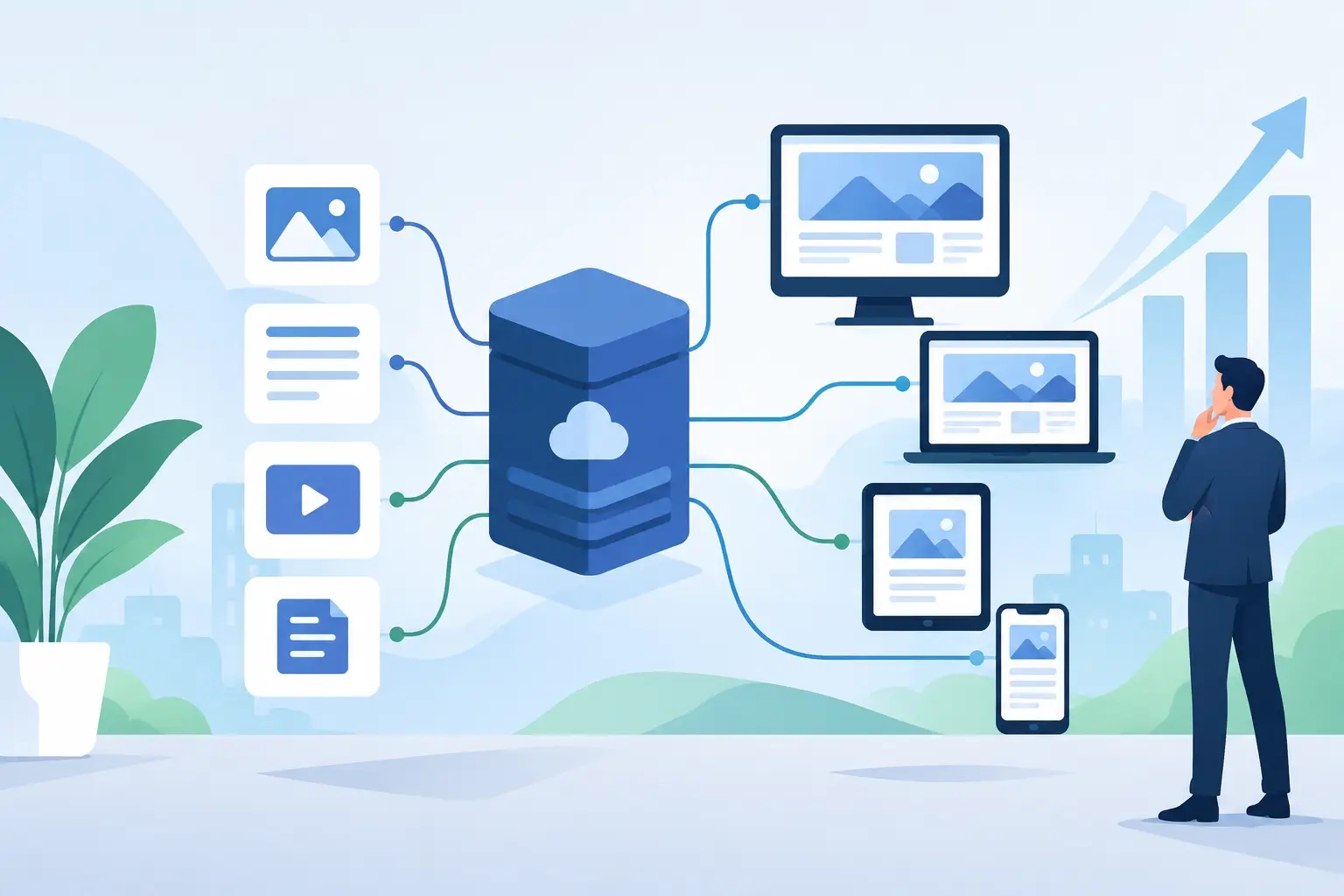
A website, an online store, and a mobile app often need the same content, but each channel displays it differently. This is exactly where comparing headless CMS options becomes a business decision, not just a technology question. The right choice can simplify your team's work, shorten time to publish, and prepare your digital solution for growth. The wrong choice means extra costs, a cluttered editorial process, or a system that's simply too complex for your actual needs.
What a headless CMS actually changes
A classic CMS combines content management and the website's display into a single system. An editor enters text, adds an image, picks a template, and immediately sees something close to the final page. This is a familiar and, for many businesses, very effective way of working.
A headless CMS, on the other hand, separates content from the website's display layer. Content such as service descriptions, articles, products, locations, testimonials, or FAQs is stored in a structured way in the admin panel. The website then displays it, through an API, in whatever user interface you've built.
This means the same service description can be used on the website, in an app for your sales team, on an information display, or in another digital channel. Content gets managed in one place, while how it's displayed adapts to each environment. For a business with multiple digital touchpoints, this can make a lot of sense. For a simple brochure site, it's not necessarily the best route.
Comparing headless CMS to a classic CMS
The biggest difference isn't whether you can edit a headline or upload a photo. Both solutions let you do that. The difference lies in the degree of flexibility, the development approach, and how many different channels your content needs to support.
A classic CMS is typically faster to get a standard website up and running. Templates, plugins, and pre-built modules mean a basic solution comes together quickly. If you need a company website, a blog, and a few simple landing pages, this approach is often rational. A good classic CMS can be secure, well-designed, and easy for editors to use, if it's correctly designed and maintained.
A headless approach has the advantage once standard frameworks start limiting a project. This happens with web applications, stores with unusual sales processes, multilingual content, integrations with business systems, or brands wanting to use the same content source across multiple channels. The development team isn't tied to a single template or display method, so the user experience can be built entirely to spec.
The price of this freedom is more planning. With a headless CMS, you need to clearly define, in advance, which content types you need, which fields editors will fill in, and how content pieces connect to each other. You also need development of the display layer, so this isn't a project you can quickly assemble out of pre-built blocks.
Editing content: simple doesn't always mean the same thing
With a classic CMS, an editor often edits content directly within the context of a specific page. This is intuitive, since they see the layout, buttons, and images almost the way a visitor would. The downside shows up when the same piece of data exists on multiple pages. Changing a phone number, a product description, or a testimonial can require a fix in several places.
A headless CMS encourages a more organized approach. Instead of building one complete page, an editor manages individual content pieces: a team member, a service, a product, a pricing tier, or an article. The system then pulls these pieces in wherever the web solution needs them. This reduces duplication, but requires a well-designed admin panel. If that's built without understanding the editorial process, even a powerful system can end up unnecessarily complicated.
So the technology alone isn't a guarantee of simple management. What matters is that the admin interface is tailored to the people who'll actually use it. A sales team, marketing, and editors don't need a development environment. They need clear fields, sensible constraints, and a predictable publishing process.
Design and website speed
For a custom-built project, a headless CMS gives the development team more control over design and performance. The display layer can be built without the constraints of a generic theme, which matters when a website needs to clearly reflect a business's identity and guide visitors toward a specific goal.
That doesn't mean every headless website is automatically faster or more attractive. Speed depends on code quality, how images load, server infrastructure, and many other decisions. The same applies to design. Flexibility only becomes an advantage when it's paired with a thoughtfully built user experience and precise execution.
The main advantage is that business requirements don't have to bend to a template's limitations. If you need a quote configurator, a login to a user portal, stock display pulled from an external system, or a specific ordering process, the solution is built around your process — not around whatever a plugin happens to support.
When a headless CMS is the right choice
A headless CMS makes the most sense when content is an important part of a broader digital system. One example is a business with a public website, a B2B portal, and a mobile app, where every channel needs to draw on the same catalogs, descriptions, and documentation. Another is a store that pulls product, price, or stock data from an ERP or another business system and needs a tailored sales flow.
It's also a good choice when a business is planning development across multiple phases. Today it might just need a new website, but a year from now, a configurator, a partner portal, or an additional language for a new market. A well-planned content structure lets the solution expand without a complete rebuild of the foundation.
A headless approach also makes sense for projects where security and stability matter especially. Separating the editorial system from public display can reduce certain risks, but on its own it doesn't substitute for a security policy, regular updates, backups, and access control. Security is a process, not a label on a piece of technology.
When a classic CMS would be the better decision
If you have a smaller website with a handful of subpages, want to publish news, and don't need special connections to external systems, a classic CMS can be a faster, more cost-effective choice. That's not a compromise on quality, as long as the solution is well-designed, technically sound, and regularly maintained.
Businesses without an in-house content team, updating their site only occasionally, also often don't need a complex content architecture. It makes sense to invest in what actually supports your business goals, not in technology that will sit unused.
An important signal is your budget for long-term development too. A headless CMS isn't a one-time purchase of functionality. It delivers the most value when you treat it as a flexible foundation you'll keep upgrading over time. If you want to finish a project once and leave it largely untouched for years, a classic solution can be the calmer choice.
The decision should be based on your business process
Before choosing a system, ask yourself a few very concrete questions. Who will manage content, and how often? Will the same information be used across multiple channels? Which external systems do you need to connect to? What does the web solution need to enable two or three years from now? And above all: which problems does it need to solve for your customers, employees, or sales team?
The answers often show that you don't need the most complex platform — you need a thoughtful architecture. Sometimes that means a classic CMS with custom development. Other times it means a headless CMS connected to a store, a CRM, logistics, or an accounting system. The right decision is the one that reduces manual work, improves the user experience, and allows for growth without costly detours.
At Moxy Web, we first look at how your business actually operates, and only then propose the technology. If you're considering a redesign, don't start with the question of which CMS is best. Start with the processes your new digital solution needs to make easier. From there, the choice becomes much clearer.